By default, when you create a 10DLC or toll-free campaign on Sendo, you will be assigned a single phone number to send messages from. However, you can easily add additional numbers to your campaign through the Sendo dashboard. To do this, open a campaign, navigate to the Numbers tab, and click “Add number” in the top right. Numbers can also be added using the /number/search and /number/buy API endpoints.Adding multiple numbers will not improve your messaging throughput or reduce the likelihood of spam filtering, as those limits are applied at the campaign level.
Note: Additional numbers cannot be added to toll-free campaigns
If your campaign has multiple senders, you can specify which number to send from by including the from field in your /message/send API call. If you do not include this field, Sendo will send messages from your default sender. You can change your default sender on the dashboard by navigating to the Numbers tab for your campaign.
Note: Please ensure the from number is in format to avoid errors.
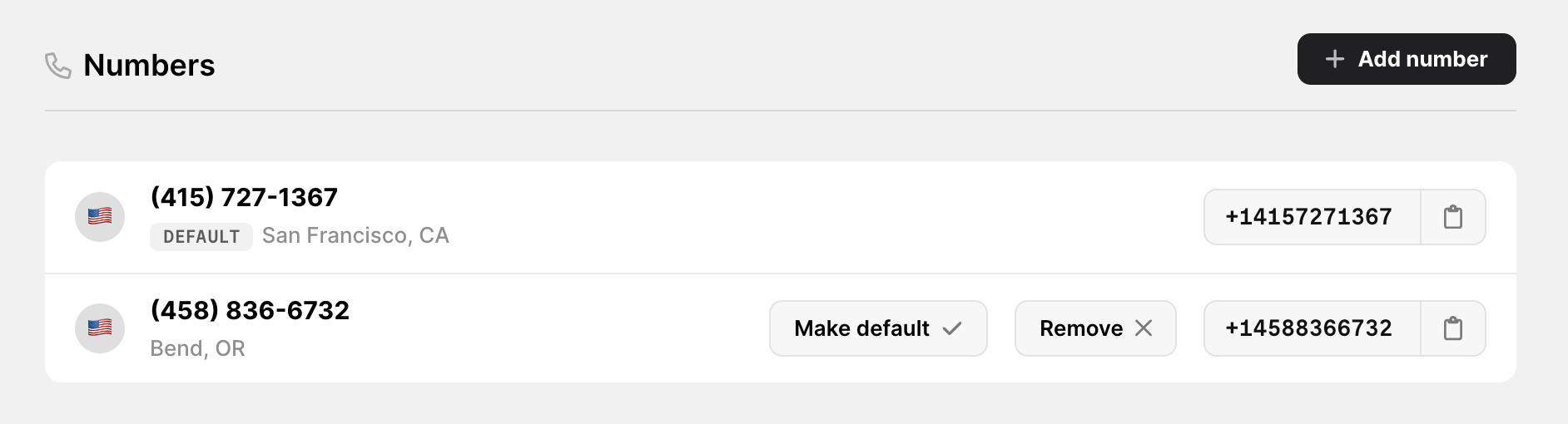
This is what your Numbers tab will look like if you have multiple senders:
As of February 7th, when you create a webhook or modify an existing one, you can specify which phone numbers to send events for. This can be helpful if you have a number for internal testing, or if you want to send events to different URLs based on the sender.
Each individual toll-free number must undergo its own verification process, because of cell industry rules. Because of this, each toll-free campaign on Sendo can only have one number. For more toll-free numbers, you can create additional campaigns.
There is a recurring charge of $2/month for each phone number attached to a campaign. This will be deducted from your balance at the same time as your campaign renewal charge. This applies to campaigns created with both 10DLC and toll-free numbers.When you purchase an additional phone number for a 10DLC (local) campaign, your balance will instantly be charged a prorated amount equal to the number of days remaining until the campaign renews. Please contact support if you have any billing questions.
Is there a limit on the number of senders I can have?
By default, a campaign can have a maximum of 50 associated phone numbers. However, this limit can be increased upon request. There may be some additional charges. Please contact support if you need to add more than 50 phone numbers to a campaign.
Yes, please contact support if you would like to purchase a large batch of phone numbers. We can easily accomodate this request. Please provide us with the campaign ID, the number of phone numbers you would like to purchase, and any preferred area code(s).
{"docsConfig":{"$schema":"https://mintlify.com/docs.json","theme":"mint","name":"Sendo","colors":{"primary":"#30B2E3","light":"#EBF7FD","dark":"#222222"},"favicon":"/favicon.png","logo":{"light":"https://mintcdn.com/winno/tzmbI69cVq0zXOlX/logo/light.png?fit=max\u0026auto=format\u0026n=tzmbI69cVq0zXOlX\u0026q=85\u0026s=f409898703163a5aacfe9831eb13e54b","dark":"https://mintcdn.com/winno/tzmbI69cVq0zXOlX/logo/dark.png?fit=max\u0026auto=format\u0026n=tzmbI69cVq0zXOlX\u0026q=85\u0026s=f376aacbe9796f6858e72819bf223bf4"},"api":{"mdx":{"server":"https://api.sendo.dev/v1/","auth":{"method":"bearer","name":null}}},"background":{"decoration":null,"color":{"light":null,"dark":"#0a0a0a"}},"navbar":{"links":[{"label":"Support","href":"mailto:support@sendo.dev"}],"primary":{"type":"button","label":"Dashboard","href":"https://sendo.dev/dashboard"}},"footer":{"socials":{"twitter":"https://twitter.com/usewinno","linkedin":"https://www.linkedin.com/company/usewinno"}},"navigation":{"pages":[]}},"deployment":{"deploymentMetadataValue":{"subdomain":"winno","hasAudioNarration":false,"actualSubdomain":"winno","customDomains":["docs.sendo.dev"],"gitSource":{"type":"github","owner":"winno-inc","repo":"sendo-docs","deployBranch":"main","contentDirectory":"","isPrivate":false,"mountPath":"","label":""},"chroma":{"liveDeploymentHistoryId":"6a21c923633bafcd4b6530a2","collectionId":"d2e30d28-97ad-4f0f-ac0d-86b8578a626d","schemaVersion":"v2"},"entitlements":{},"buildId":"6ae91d0e4f09cc61811efa62:success","clientVersion":"0.0.4054","searchFilterCounts":[{"language":"default","tag":"API Reference","count":35},{"language":"default","tag":"Knowledge Base","count":17},{"language":"default","tag":"Guides","count":7},{"language":"default","tag":"Campaign","count":6},{"language":"default","tag":"Registrations","count":5},{"language":"default","tag":"Number","count":4},{"language":"default","tag":"Brand","count":3},{"language":"default","tag":"Message","count":3},{"language":"default","tag":"Webhook","count":3},{"language":"default","tag":"Compliance","count":3}]},"assistantConfig":{},"basePath":"","hasChatPermissions":false,"hasWebMcpPermissions":false,"toggles":[{"name":"kill-isr","enabled":true,"variant":{"name":"disabled","enabled":false,"feature_enabled":true},"impressionData":false},{"name":"agent-mintlify-slack","enabled":true,"variant":{"name":"disabled","enabled":false,"feature_enabled":true},"impressionData":false},{"name":"agent-integrations-settings","enabled":true,"variant":{"name":"disabled","enabled":false,"feature_enabled":true},"impressionData":false},{"name":"automations-pr-grouping","enabled":true,"variant":{"name":"disabled","enabled":false,"feature_enabled":true},"impressionData":false},{"name":"custom-prefix","enabled":true,"variant":{"name":"disabled","enabled":false,"feature_enabled":true},"impressionData":false},{"name":"analytics-v7","enabled":true,"variant":{"name":"disabled","enabled":false,"feature_enabled":true},"impressionData":false},{"name":"user-flows-analytics","enabled":true,"variant":{"name":"disabled","enabled":false,"feature_enabled":true},"impressionData":false},{"name":"no-publish-flow","enabled":true,"variant":{"name":"disabled","enabled":false,"feature_enabled":true},"impressionData":false},{"name":"workos-onboarding","enabled":true,"variant":{"name":"disabled","enabled":false,"feature_enabled":true},"impressionData":false},{"name":"llms-txt-v2","enabled":true,"variant":{"name":"disabled","enabled":false,"feature_enabled":true},"impressionData":false},{"name":"snapshot-serving-live","enabled":true,"variant":{"name":"disabled","enabled":false,"feature_enabled":true},"impressionData":false},{"name":"stripTemperatureMiddleware","enabled":true,"variant":{"name":"disabled","enabled":false,"feature_enabled":true},"impressionData":false},{"name":"support-platform-pylon-zendesk","enabled":true,"variant":{"name":"disabled","enabled":false,"feature_enabled":true},"impressionData":false},{"name":"snapshot-serving","enabled":true,"variant":{"name":"disabled","enabled":false,"feature_enabled":true},"impressionData":false},{"name":"instant-rollback","enabled":true,"variant":{"name":"disabled","enabled":false,"feature_enabled":true},"impressionData":false},{"name":"granular-notifications-server","enabled":true,"variant":{"name":"disabled","enabled":false,"feature_enabled":true},"impressionData":false},{"name":"granular-notifications","enabled":true,"variant":{"name":"disabled","enabled":false,"feature_enabled":true},"impressionData":false},{"name":"automations-fable","enabled":true,"variant":{"name":"disabled","enabled":false,"feature_enabled":true},"impressionData":false},{"name":"fixed-ai-action-pricing","enabled":true,"variant":{"name":"disabled","enabled":false,"feature_enabled":true},"impressionData":false},{"name":"automation-resolve-merge-conflict","enabled":true,"variant":{"name":"disabled","enabled":false,"feature_enabled":true},"impressionData":false},{"name":"scoped-publishing","enabled":true,"variant":{"name":"disabled","enabled":false,"feature_enabled":true},"impressionData":false},{"name":"mintql","enabled":true,"variant":{"name":"disabled","enabled":false,"feature_enabled":true},"impressionData":false},{"name":"page-level-analytics","enabled":true,"variant":{"name":"disabled","enabled":false,"feature_enabled":true},"impressionData":false},{"name":"editor-version-history-v2","enabled":true,"variant":{"name":"disabled","enabled":false,"feature_enabled":true},"impressionData":false},{"name":"billing-page-v2","enabled":true,"variant":{"name":"disabled","enabled":false,"feature_enabled":true},"impressionData":false},{"name":"full-page-search","enabled":true,"variant":{"name":"disabled","enabled":false,"feature_enabled":true},"impressionData":false},{"name":"workspace-projects","enabled":true,"variant":{"name":"disabled","enabled":false,"feature_enabled":true},"impressionData":false},{"name":"assistant-v5","enabled":true,"variant":{"name":"disabled","enabled":false,"feature_enabled":true},"impressionData":false},{"name":"byok-sep-25","enabled":true,"variant":{"name":"disabled","enabled":false,"feature_enabled":true},"impressionData":false},{"name":"fork-pr-previews","enabled":true,"variant":{"name":"disabled","enabled":false,"feature_enabled":true},"impressionData":false},{"name":"revalidation-jwt","enabled":true,"variant":{"name":"disabled","enabled":false,"feature_enabled":true},"impressionData":false},{"name":"vite-origin","enabled":true,"variant":{"name":"disabled","enabled":false,"feature_enabled":true},"impressionData":false},{"name":"billing-updated-9-15","enabled":true,"variant":{"name":"disabled","enabled":false,"feature_enabled":true},"impressionData":false},{"name":"workos-sso-scim","enabled":true,"variant":{"name":"disabled","enabled":false,"feature_enabled":true},"impressionData":false},{"name":"hobby-abuse-scan","enabled":true,"variant":{"name":"disabled","enabled":false,"feature_enabled":true},"impressionData":false},{"name":"dashboard-inbox","enabled":true,"variant":{"name":"disabled","enabled":false,"feature_enabled":true},"impressionData":false},{"name":"workos-signup","enabled":true,"variant":{"name":"disabled","enabled":false,"feature_enabled":true},"impressionData":false},{"name":"turbopuffer-dual-write","enabled":true,"variant":{"name":"disabled","enabled":false,"feature_enabled":true},"impressionData":false},{"name":"workos-enabled","enabled":true,"variant":{"name":"disabled","enabled":false,"feature_enabled":true},"impressionData":false},{"name":"approve-review-flow","enabled":true,"variant":{"name":"disabled","enabled":false,"feature_enabled":true},"impressionData":false},{"name":"sso-setup-deadline-banner","enabled":true,"variant":{"name":"disabled","enabled":false,"feature_enabled":true},"impressionData":false},{"name":"rbac-expansion","enabled":true,"variant":{"name":"disabled","enabled":false,"feature_enabled":true},"impressionData":false}],"googleFontsInlined":false},"customCss":[],"page":{"pagePath":"api-reference/senders","slug":"/api-reference/senders","pageMetadata":{"title":"Multiple senders","sidebarTitle":"Multiple senders","description":"How to send messages from multiple numbers.","href":"/api-reference/senders"},"description":{"compiledSource":"\"use strict\";\nconst {jsx: _jsx} = arguments[0];\nconst {useMDXComponents: _provideComponents} = arguments[0];\nfunction _createMdxContent(props) {\n const _components = {\n p: \"p\",\n ..._provideComponents(),\n ...props.components\n };\n return _jsx(_components.p, {\n children: \"How to send messages from multiple numbers.\"\n });\n}\nfunction MDXContent(props = {}) {\n const {wrapper: MDXLayout} = {\n ..._provideComponents(),\n ...props.components\n };\n return MDXLayout ? _jsx(MDXLayout, {\n ...props,\n children: _jsx(_createMdxContent, {\n ...props\n })\n }) : _createMdxContent(props);\n}\nreturn {\n default: MDXContent\n};\n","frontmatter":{},"scope":{}},"pageType":"default","mdx":{"mdxSource":{"compiledSource":"\"use strict\";const{Fragment:_Fragment,jsx:_jsx,jsxs:_jsxs}=arguments[0];const{useMDXComponents:_provideComponents}=arguments[0];function _createMdxContent(props){const _components={a:`a`,code:`code`,p:`p`,strong:`strong`,..._provideComponents(),...props.components},{Heading,Note,OptimizedImage,Tooltip}=_components;if(!Heading)_missingMdxReference(`Heading`,true);if(!Note)_missingMdxReference(`Note`,true);if(!OptimizedImage)_missingMdxReference(`OptimizedImage`,true);if(!Tooltip)_missingMdxReference(`Tooltip`,true);return _jsxs(_Fragment,{children:[_jsxs(_components.p,{children:[`By default, when you create a 10DLC or toll-free campaign on Sendo, you will be assigned a single phone number to send messages from. However, you can easily add additional numbers to your campaign through the Sendo dashboard. To do this, open a campaign, navigate to the Numbers tab, and click “Add number” in the top right. Numbers can also be added using the `,_jsx(_components.a,{href:`/api-reference/number/search`,children:_jsx(_components.code,{children:`/number/search`})}),` and `,_jsx(_components.a,{href:`/api-reference/number/buy`,children:_jsx(_components.code,{children:`/number/buy`})}),` API endpoints.`]}),`\n`,_jsx(_components.p,{children:`Adding multiple numbers will not improve your messaging throughput or reduce the likelihood of spam filtering, as those limits are applied at the campaign level.`}),`\n`,_jsxs(Note,{children:[_jsx(_components.strong,{children:`Note:`}),` Additional numbers cannot be added to toll-free campaigns`]}),`\n`,_jsx(Heading,{level:`3`,id:`sending-messages`,children:`Sending messages`}),`\n`,_jsxs(_components.p,{children:[`If your campaign has multiple senders, you can specify which number to send from by including the `,_jsx(_components.code,{children:`from`}),` field in your `,_jsx(_components.code,{children:`/message/send`}),` API call. If you do not include this field, Sendo will send messages from your default sender. You can change your default sender on the dashboard by navigating to the Numbers tab for your campaign.`]}),`\n`,_jsxs(Note,{children:[_jsx(_components.strong,{children:`Note:`}),` Please ensure the `,_jsx(_components.code,{children:`from`}),` number is in `,_jsx(Tooltip,{tip:`I.e. +14155552671. Must start with +1 and be followed by the 10 digit number with no spaces or special characters.`,children:`E.164`}),` format to avoid errors.`]}),`\n`,_jsx(_components.p,{children:`This is what your Numbers tab will look like if you have multiple senders:`}),`\n`,_jsx(OptimizedImage,{width:`80%`,src:`https://sendo-media.s3.us-east-2.amazonaws.com/Screenshot+2024-01-04+at+2.59.13+PM.png`}),`\n`,_jsx(Heading,{level:`3`,id:`webhooks`,children:`Webhooks`}),`\n`,_jsxs(_components.p,{children:[`As of February 7th, when you create a `,_jsx(_components.a,{href:`/api-reference/webhooks`,children:`webhook`}),` or modify an existing one, you can specify which phone numbers to send events for. This can be helpful if you have a number for internal testing, or if you want to send events to different URLs based on the sender.`]}),`\n`,_jsx(Heading,{level:`2`,id:`faqs`,children:`FAQs`}),`\n`,_jsx(Heading,{level:`4`,id:`why-aren’t-toll-free-numbers-supported`,children:`Why aren’t toll-free numbers supported?`}),`\n`,_jsx(_components.p,{children:`Each individual toll-free number must undergo its own verification process, because of cell industry rules. Because of this, each toll-free campaign on Sendo can only have one number. For more toll-free numbers, you can create additional campaigns.`}),`\n`,_jsx(Heading,{level:`4`,id:`are-there-any-fees-for-additional-numbers`,children:`Are there any fees for additional numbers?`}),`\n`,_jsxs(_components.p,{children:[`There is a recurring charge of `,_jsx(_components.strong,{children:`$2`}),`/month for each phone number attached to a campaign. This will be deducted from your balance at the same time as your campaign renewal charge. This applies to campaigns created with both 10DLC and toll-free numbers.`]}),`\n`,_jsx(_components.p,{children:`When you purchase an additional phone number for a 10DLC (local) campaign, your balance will instantly be charged a prorated amount equal to the number of days remaining until the campaign renews. Please contact support if you have any billing questions.`}),`\n`,_jsx(Heading,{level:`4`,id:`is-there-a-limit-on-the-number-of-senders-i-can-have`,children:`Is there a limit on the number of senders I can have?`}),`\n`,_jsxs(_components.p,{children:[`By default, a campaign can have a maximum of `,_jsx(_components.strong,{children:`50`}),` associated phone numbers. However, this limit can be increased upon request. There may be some additional charges. Please contact support if you need to add more than 50 phone numbers to a campaign.`]}),`\n`,_jsx(Heading,{level:`4`,id:`can-i-place-a-bulk-order-of-phone-numbers`,children:`Can I place a bulk order of phone numbers?`}),`\n`,_jsxs(_components.p,{children:[`Yes, please `,_jsx(_components.a,{href:`mailto:support@sendo.dev`,children:`contact support`}),` if you would like to purchase a large batch of phone numbers. We can easily accomodate this request. Please provide us with the campaign ID, the number of phone numbers you would like to purchase, and any preferred area code(s).`]})]})}function MDXContent(props={}){const{wrapper:MDXLayout}={..._provideComponents(),...props.components};return MDXLayout?_jsx(MDXLayout,{...props,children:_jsx(_createMdxContent,{...props})}):_createMdxContent(props)}return{default:MDXContent};function _missingMdxReference(id,component){throw new Error(`Expected `+(component?`component`:`object`)+\" `\"+id+\"` to be defined: you likely forgot to import, pass, or provide it.\")}","frontmatter":{},"scope":{"config":{},"pageMetadata":{"title":"Multiple senders","sidebarTitle":"Multiple senders","description":"How to send messages from multiple numbers.","href":"/api-reference/senders"}}},"mdxSourceWithNoJs":null},"mdxExtracts":{"tableOfContents":[{"title":"Sending messages","slug":"sending-messages","depth":3,"children":[]},{"title":"Webhooks","slug":"webhooks","depth":3,"children":[]},{"title":"FAQs","slug":"faqs","depth":2,"children":[{"title":"Why aren’t toll-free numbers supported?","slug":"why-aren’t-toll-free-numbers-supported","depth":4,"children":[]},{"title":"Are there any fees for additional numbers?","slug":"are-there-any-fees-for-additional-numbers","depth":4,"children":[]},{"title":"Is there a limit on the number of senders I can have?","slug":"is-there-a-limit-on-the-number-of-senders-i-can-have","depth":4,"children":[]},{"title":"Can I place a bulk order of phone numbers?","slug":"can-i-place-a-bulk-order-of-phone-numbers","depth":4,"children":[]}]}],"codeExamples":{}},"jsLinks":[],"subdomain":"winno","siteName":"Sendo","title":"Multiple senders - Sendo","navMaps":{"firstHrefInVersion":{},"firstHrefInLanguage":{}},"lastModified":"2026-01-06T23:44:23.757Z","originalFileLocation":"api-reference/senders.mdx"},"headHtml":"\u003cscript data-mint-head>(function(){var d=document.documentElement,p=null;if(!p){try{p=localStorage.getItem(\"isDarkMode\")}catch(e){}if(p==='true')p='dark';else if(p==='false')p='light';if(p!=='light'\u0026\u0026p!=='dark'\u0026\u0026p!=='system')p=\"system\"}var r=p==='system'?(matchMedia(\"(prefers-color-scheme: dark)\").matches?'dark':'light'):p;d.classList.remove(r==='dark'?'light':'dark');d.classList.add(r);d.setAttribute(\"data-theme-preference\",p)})();\u003c/script>\u003cmeta data-mint-head name=\"description\" content=\"How to send messages from multiple numbers.\">\u003cmeta data-mint-head name=\"application-name\" content=\"Sendo\">\u003cmeta data-mint-head name=\"generator\" content=\"Mintlify\">\u003clink data-mint-head rel=\"icon\" type=\"image/png\" sizes=\"192x192\" href=\"/mintlify-assets/_mintlify/favicons/winno/W0yqjplxwklRlTq3/_generated/favicon/android-chrome-192x192.png\" media=\"(prefers-color-scheme: light)\">\u003clink data-mint-head rel=\"apple-touch-icon\" type=\"image/png\" sizes=\"180x180\" href=\"/mintlify-assets/_mintlify/favicons/winno/W0yqjplxwklRlTq3/_generated/favicon/apple-touch-icon.png\">\u003clink data-mint-head rel=\"icon\" type=\"image/png\" sizes=\"16x16\" href=\"/mintlify-assets/_mintlify/favicons/winno/W0yqjplxwklRlTq3/_generated/favicon/favicon-16x16.png\" media=\"(prefers-color-scheme: light)\">\u003clink data-mint-head rel=\"icon\" type=\"image/png\" sizes=\"32x32\" href=\"/mintlify-assets/_mintlify/favicons/winno/W0yqjplxwklRlTq3/_generated/favicon/favicon-32x32.png\" media=\"(prefers-color-scheme: light)\">\u003clink data-mint-head rel=\"shortcut icon\" type=\"image/x-icon\" href=\"/mintlify-assets/_mintlify/favicons/winno/W0yqjplxwklRlTq3/_generated/favicon/favicon.ico\" media=\"(prefers-color-scheme: light)\">\u003clink data-mint-head rel=\"icon\" type=\"image/png\" sizes=\"192x192\" href=\"/mintlify-assets/_mintlify/favicons/winno/W0yqjplxwklRlTq3/_generated/favicon-dark/android-chrome-192x192.png\" media=\"(prefers-color-scheme: dark)\">\u003clink data-mint-head rel=\"icon\" type=\"image/png\" sizes=\"16x16\" href=\"/mintlify-assets/_mintlify/favicons/winno/W0yqjplxwklRlTq3/_generated/favicon-dark/favicon-16x16.png\" media=\"(prefers-color-scheme: dark)\">\u003clink data-mint-head rel=\"icon\" type=\"image/png\" sizes=\"32x32\" href=\"/mintlify-assets/_mintlify/favicons/winno/W0yqjplxwklRlTq3/_generated/favicon-dark/favicon-32x32.png\" media=\"(prefers-color-scheme: dark)\">\u003clink data-mint-head rel=\"shortcut icon\" type=\"image/x-icon\" href=\"/mintlify-assets/_mintlify/favicons/winno/W0yqjplxwklRlTq3/_generated/favicon-dark/favicon.ico\" media=\"(prefers-color-scheme: dark)\">\u003cmeta data-mint-head property=\"og:title\" content=\"Multiple senders - Sendo\">\u003cmeta data-mint-head property=\"og:description\" content=\"How to send messages from multiple numbers.\">\u003cmeta data-mint-head property=\"og:site_name\" content=\"Sendo\">\u003cmeta data-mint-head property=\"og:url\" content=\"https://docs.sendo.dev/api-reference/senders\">\u003cmeta data-mint-head property=\"og:type\" content=\"website\">\u003cmeta data-mint-head property=\"og:image\" content=\"https://winno.mintlify.app/_mintlify/api/og/v2?division=API+Reference\u0026amp;title=Multiple+senders\u0026amp;description=How+to+send+messages+from+multiple+numbers.\u0026amp;theme=b1059a098190172a140d9d9c\u0026amp;signature=d557b481de011ff4f609c1b32a8f5a7723a30568421a4016074194b40eb45edc\">\u003cmeta data-mint-head property=\"og:image:width\" content=\"1200\">\u003cmeta data-mint-head property=\"og:image:height\" content=\"630\">\u003cmeta data-mint-head name=\"twitter:card\" content=\"summary_large_image\">\u003cmeta data-mint-head name=\"twitter:title\" content=\"Multiple senders - Sendo\">\u003cmeta data-mint-head name=\"twitter:description\" content=\"How to send messages from multiple numbers.\">\u003cmeta data-mint-head name=\"twitter:image\" content=\"https://winno.mintlify.app/_mintlify/api/og/v2?division=API+Reference\u0026amp;title=Multiple+senders\u0026amp;description=How+to+send+messages+from+multiple+numbers.\u0026amp;theme=b1059a098190172a140d9d9c\u0026amp;signature=d557b481de011ff4f609c1b32a8f5a7723a30568421a4016074194b40eb45edc\">\u003cmeta data-mint-head name=\"twitter:image:width\" content=\"1200\">\u003cmeta data-mint-head name=\"twitter:image:height\" content=\"630\">\u003cmeta data-mint-head name=\"msapplication-config\" content=\"/mintlify-assets/_mintlify/favicons/winno/W0yqjplxwklRlTq3/_generated/favicon/browserconfig.xml\">\u003cmeta data-mint-head name=\"apple-mobile-web-app-title\" content=\"Sendo\">\u003cmeta data-mint-head name=\"msapplication-TileColor\" content=\"#30B2E3\">\u003clink data-mint-head rel=\"canonical\" href=\"https://docs.sendo.dev/api-reference/senders\">\u003clink data-mint-head rel=\"alternate\" type=\"application/xml\" href=\"/sitemap.xml\">\u003clink data-mint-head rel=\"alternate\" type=\"text/markdown\" href=\"/api-reference/senders.md\">\u003cscript data-mint-head type=\"application/ld+json\">{\"@context\":\"https://schema.org\",\"@graph\":[{\"@type\":\"Organization\",\"@id\":\"https://docs.sendo.dev/#organization\",\"name\":\"Sendo\",\"url\":\"https://docs.sendo.dev\",\"logo\":{\"@type\":\"ImageObject\",\"url\":\"https://mintcdn.com/winno/tzmbI69cVq0zXOlX/logo/light.png?fit=max\u0026auto=format\u0026n=tzmbI69cVq0zXOlX\u0026q=85\u0026s=f409898703163a5aacfe9831eb13e54b\"}},{\"@type\":\"WebSite\",\"@id\":\"https://docs.sendo.dev#website\",\"name\":\"Sendo\",\"url\":\"https://docs.sendo.dev\",\"publisher\":{\"@id\":\"https://docs.sendo.dev/#organization\"}},{\"@type\":\"WebPage\",\"@id\":\"https://docs.sendo.dev/api-reference/senders#webpage\",\"url\":\"https://docs.sendo.dev/api-reference/senders\",\"name\":\"Multiple senders\",\"description\":\"How to send messages from multiple numbers.\",\"dateModified\":\"2026-01-06T23:44:23.757Z\",\"isPartOf\":{\"@id\":\"https://docs.sendo.dev#website\"},\"breadcrumb\":{\"@id\":\"https://docs.sendo.dev/api-reference/senders#breadcrumb\"}},{\"@type\":\"BreadcrumbList\",\"@id\":\"https://docs.sendo.dev/api-reference/senders#breadcrumb\",\"itemListElement\":[{\"@type\":\"ListItem\",\"position\":1,\"name\":\"API Reference\",\"item\":\"https://docs.sendo.dev/api-reference/introduction\"},{\"@type\":\"ListItem\",\"position\":2,\"name\":\"Multiple senders\",\"item\":\"https://docs.sendo.dev/api-reference/senders\"}]},{\"@type\":[\"Article\",\"TechArticle\"],\"@id\":\"https://docs.sendo.dev/api-reference/senders#article\",\"headline\":\"Multiple senders\",\"name\":\"Multiple senders\",\"description\":\"How to send messages from multiple numbers.\",\"url\":\"https://docs.sendo.dev/api-reference/senders\",\"mainEntityOfPage\":{\"@id\":\"https://docs.sendo.dev/api-reference/senders#webpage\"},\"dateModified\":\"2026-01-06T23:44:23.757Z\",\"publisher\":{\"@id\":\"https://docs.sendo.dev/#organization\"},\"isPartOf\":{\"@id\":\"https://docs.sendo.dev#website\"}}]}\u003c/script>\u003cscript data-mint-head type=\"application/ld+json\">{\"@context\":\"https://schema.org\",\"@type\":\"WebSite\",\"name\":\"Sendo\",\"creator\":{\"@type\":\"Organization\",\"name\":\"Mintlify\",\"url\":\"https://mintlify.com\"}}\u003c/script>","siteName":"Sendo","nav":{"global":null,"anchors":[{"anchor":"API Reference","icon":"rectangle-terminal","groups":[{"group":"API Reference","pages":[{"title":"Introduction","href":"/api-reference/introduction"},{"title":"Webhooks","href":"/api-reference/webhooks"},{"title":"MMS Messaging","sidebarTitle":"Sending MMS","href":"/api-reference/media"},{"title":"Sending vCards","sidebarTitle":"Contact cards","description":"How to send contact cards to recipients.","href":"/api-reference/vcards"},{"title":"Multiple senders","sidebarTitle":"Multiple senders","href":"/api-reference/senders"},{"title":"Errors","sidebarTitle":"Error codes","description":"Troubleshoot problems with message deliveries.","href":"/api-reference/errors"},{"title":"Carrier limits","sidebarTitle":"Carrier limits","href":"/api-reference/limits"},{"title":"Custom metadata","sidebarTitle":"Metadata","href":"/api-reference/metadata"}]},{"group":"Message","pages":[{"title":"Send message","api":"POST https://api.sendo.dev/v1/message/send","href":"/api-reference/message/send"},{"title":"Retrieve message","api":"GET https://api.sendo.dev/v1/message/{id}","href":"/api-reference/message/retrieve"},{"title":"List messages","api":"GET https://api.sendo.dev/v1/message/list","href":"/api-reference/message/list"}]},{"group":"Brand","pages":[{"title":"Create brand","api":"POST https://api.sendo.dev/v1/brand/create","href":"/api-reference/brand/create"},{"title":"Retrieve brand","api":"GET https://api.sendo.dev/v1/brand/{id}","href":"/api-reference/brand/retrieve"},{"title":"List brands","api":"GET https://api.sendo.dev/v1/brand/list","href":"/api-reference/brand/list"}]},{"group":"Campaign","pages":[{"title":"Create campaign","api":"POST https://api.sendo.dev/v1/campaign/create","href":"/api-reference/campaign/create"},{"title":"Retrieve campaign","api":"GET https://api.sendo.dev/v1/campaign/{id}","href":"/api-reference/campaign/retrieve"},{"title":"List campaigns","api":"GET https://api.sendo.dev/v1/campaign/list","href":"/api-reference/campaign/list"},{"title":"Create webhook","api":"POST https://api.sendo.dev/v1/campaign/{id}/webhooks","href":"/api-reference/campaign/create-webhook"},{"title":"List webhooks","api":"GET https://api.sendo.dev/v1/campaign/{id}/webhooks","href":"/api-reference/campaign/webhooks"},{"title":"List numbers","api":"GET https://api.sendo.dev/v1/campaign/{id}/numbers","href":"/api-reference/campaign/numbers"}]},{"group":"Number","pages":[{"title":"Search numbers","api":"GET https://api.sendo.dev/v1/number/search","href":"/api-reference/number/search"},{"title":"Buy number","api":"POST https://api.sendo.dev/v1/number/buy","href":"/api-reference/number/buy"},{"title":"Retrieve number","api":"GET https://api.sendo.dev/v1/number/{number}","href":"/api-reference/number/retrieve"},{"title":"Set forwarding","api":"PATCH https://api.sendo.dev/v1/number/{number}/forwarding","href":"/api-reference/number/forward"}]},{"group":"Webhook","pages":[{"title":"Retrieve webhook","api":"GET https://api.sendo.dev/v1/webhook/{id}","href":"/api-reference/webhook/retrieve"},{"title":"Update webhook","api":"PATCH https://api.sendo.dev/v1/webhook/{id}","href":"/api-reference/webhook/update"},{"title":"Delete webhook","api":"DELETE https://api.sendo.dev/v1/webhook/{id}","href":"/api-reference/webhook/delete"}]}]},{"anchor":"Knowledge Base","icon":"books","pages":[{"title":"Knowledge Base","href":"/knowledge-base/overview"}]},{"anchor":"Changelog","icon":"clock-rotate-left","pages":[{"title":"Changelog","href":"/changelog/changelog"}]},{"anchor":"RCS Support","icon":"message-dots","pages":[{"title":"RCS Support","href":"/rcs/upcoming"}]},{"anchor":"API Status","href":"https://status.sendo.dev","icon":"signal-bars"}]},"basePath":"","title":"Multiple senders - Sendo","buildId":"dpl_345ReqzYaAjzS9QpeJemsKdb7KDj","deploymentId":"dpl_345ReqzYaAjzS9QpeJemsKdb7KDj","dynamics":["a74be98ba7"],"chunks":["zoom-image-lightbox-B4-wUcHm.js","lightbox-handle-r17bVUz3.js"]}